

Congratulations on your purchase and welcome to Philips! To fully benefit from the support that Philips offers, register your product at www.philips.com/welcome.
- Skin protector
- Body groomer
- Extra-wide hair trimmer
- Precision trimmer
- Nose and ear hair trimmer
- Precision shaver
- Full-size hair trimmer
- On/off button
- Battery status indicator
- Socket for small plug
- USB cable
- Note: A suitable power source (e.g. Philips HQ87) is available via www.philips.com/support.
- Precision trimming comb 1 mm – 3 mm
- Adjustable beard and hair comb 3 mm – 7 mm
- Adjustable beard and hair comb 9 mm – 13 mm
- Adjustable beard and hair comb 16 mm – 20 mm
- Eyebrow comb 6 mm
- Hair comb 4 mm
- Hair comb 9 mm
- Hair comb 12 mm
- Hair comb 16 mm
- Fading hair comb 4 mm – 9 mm
- Fading hair comb 4 mm – 9 mm
- Hair comb 2 mm
- Body comb 3 mm
- Body comb 5 mm
Not shown: cleaning brush and pouch
The accessories supplied may vary for specific model numbers. A detailed list of the accessories supplied with your model can be found on the packaging and in the user manual delivered with your product.
You can find the model number on the back of your product.
The full model number (e.g. MG1234/56) is located on the bottom of the packaging, your receipt or order confirmation.
Read this important information carefully before you use the appliance and its accessories and save it for future reference. The accessories supplied may vary for different products.
Warning
- To charge the product, only use a certified safety extra low voltage (SELV) supply unit with output rating 5 V, ≥ 1 A. For safe charging in a moist environment (e.g. in a bathroom), only use an IPX4 (splash-proof) supply unit. A suitable supply unit (e.g. Philips HQ87) is available via www.philips.com/support. If you need support finding the correct USB supply unit, contact the Consumer Care Center in your country (see the international warranty leaflet for contact details). Using a non-certified supply unit may cause hazards or serious injuries.
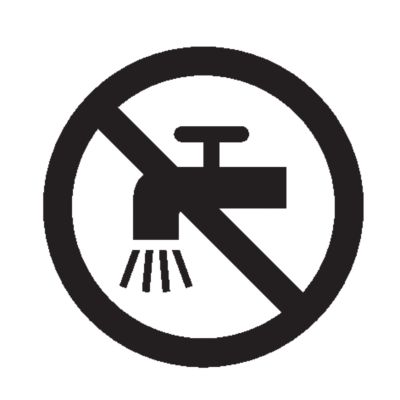
- Keep the USB cable, the USB supply unit and the charging stand (if provided) dry.

- This appliance is waterproof. It is suitable for use in the bath or shower and for cleaning under the tap. For safety reasons, the appliance can therefore only be used without cord.
- This appliance can be used by children aged from 8 years and above and persons with reduced physical, sensory or mental capabilities or lack of experience and knowledge if they have been given supervision or instruction concerning use of the appliance in a safe way and understand the hazards involved. Children shall not play with the appliance. Cleaning and user maintenance shall not be made by children without supervision.
- Do not modify the supply unit.
- Do not use the supply unit in or near wall sockets that contain an electric air freshener to prevent irreparable damage to the supply unit.
- Do not use a damaged appliance. Replace damaged parts with new Philips parts.
- Because of hygiene, only one person should use the appliance.
- Unplug the appliance before cleaning it with water.
- Only use cold or lukewarm water to clean the appliance.
- Never use compressed air, scouring pads, abrasive cleaning agents or aggressive liquids to clean the appliance.
- Water may drip from the socket at the bottom of the appliance when you rinse it. This is normal and not dangerous because all electronics are enclosed in a sealed power unit inside the appliance.
- Only use original Philips accessories or consumables.
- Charge, use and store the product at a temperature between 5 °C and 35 °C.
- Keep product and batteries away from fire and do not expose them to direct sunlight or high temperatures.
- If the product becomes abnormally hot or smelly, changes color or if charging takes longer than usual, stop using and charging the product and contact Philips.
- Do not place products and their batteries in microwave ovens or on induction cookers.
- Do not open, modify, pierce, damage or dismantle the product or battery to prevent batteries from heating up or releasing toxic or hazardous substances. Do not short-circuit, overcharge or reverse charge batteries.
- If batteries are damaged or leaking, avoid contact with the skin or eyes. If this occurs, immediately rinse well with water and seek medical care.
- This appliance is waterproof. It is suitable for use in the bath or shower and for cleaning under the tap.
- Switch off the appliance before removing or attaching attachments and before cleaning.
- Clean the appliance after each use.
- Never use compressed air, scouring pads, abrasive cleaning agents or aggressive liquids such as gasoline or acetone to clean the appliance.
- Caution: Never dry the trimmer teeth with a towel or tissue, as this may damage the trimmer teeth.
- Charging or using the appliance at temperatures below 5 °C or higher than 35 °C adversely affects the lifespan of the battery.
- If the appliance is subjected to a major change in temperature, pressure or humidity, let the appliance acclimatize for 30 minutes before use.
Charge the appliance before first use and when the battery status indicator shows that the battery is almost empty. When the appliance has charged for 60 minutes, it has a cordless operating time of up to 120 minutes.
Warning: Keep the USB cable and the USB power source dry.
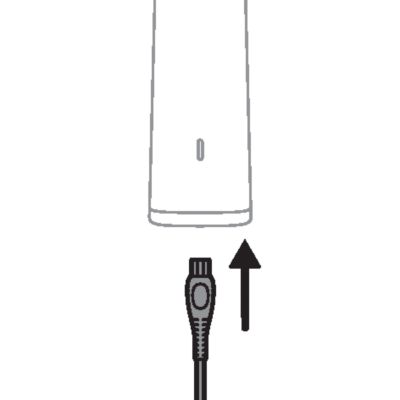
- Make sure that the appliance is switched off.
- Plug it in
- Insert the small plug of the USB cable into the socket in the bottom of the appliance.
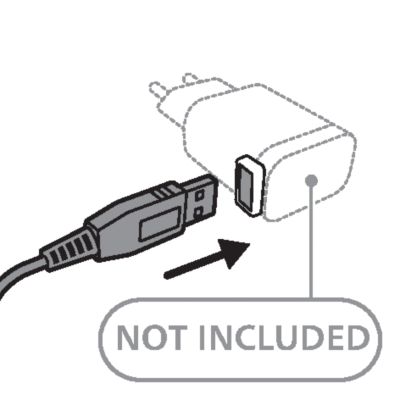
- Connect an adapter
- Insert the USB plug into the USB power source (not included).
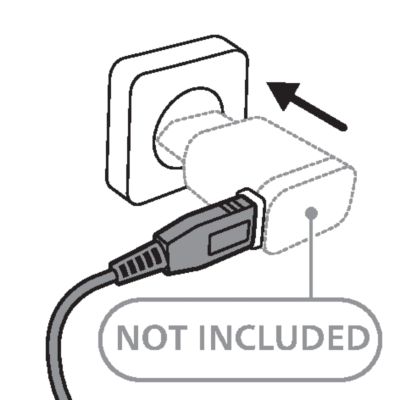
- Attach to the power source
- Insert the USB power source into the power outlet.
- Unplug to use
- After charging, remove the USB power source from the power outlet and pull the small plug out of the appliance.
Quick charge
After approx. 5 minutes of charging, the appliance contains enough power for one cordless trimming session.
Battery status indications
When the battery status indicator flashes orange, it means that the battery is almost empty.
When the battery status indicator flashes white, it means that the battery is charging.
When the battery status indicator lights up white continuously, it means that the battery is fully charged.
Note: Approx. 30 minutes after the battery is fully charged, the battery status indicator switches off automatically.
Trimming tips
- When trimming for the first time, start by using the comb with the maximum trimming length setting to familiarize yourself with the appliance.
- Since all hairs do not grow in the same direction, you may want to try different trimming directions (i.e. upwards, downwards, or across). Practice is best for optimum results.
- Always make smooth and gentle movements and be sure the surface of the comb always stays in contact with your skin.
- For best results, use the appliance on clean, dry hair, as wet hair tends to stick to the body.
- When too many hairs have accumulated on the appliance, remove the hairs before and/or during use, for best trimming results.
Detaching and attaching cutting elements
- To detach a cutting element, place your finger near the teeth of the cutting element and push gently upwards until the cutting element is released from the handle.
-
- Press the teeth downwards
- To attach a cutting element, insert the plastic notch at the back of the cutting element into the guiding slot in the handle and gently press the teeth of the cutting element downwards until they click into place.
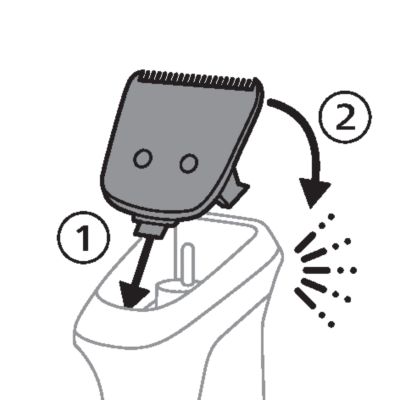
Detaching the precision shaver and nose trimmer
- Place your finger on the recess at the back of the attachment and push the attachment off the handle. Use your other hand to prevent the attachment from falling on the floor.
Detaching and attaching guards
- To attach any type of comb onto a cutting element,slide the front part of the comb onto the teeth and press the notch at the back of the comb downwards until it clicks into place.
-
- Carefully push the back part off
- To detach any type of comb from the cutting element, carefully push its back part off the appliance and then slide it off the cutting element.
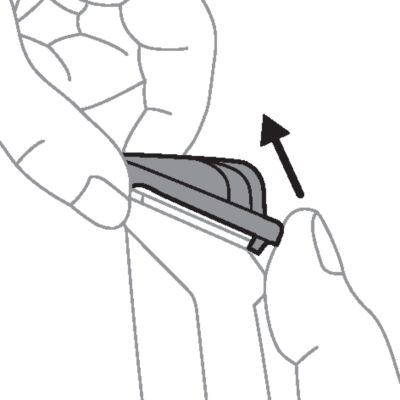
Switching the appliance on and off
To switch the appliance on or off, press the on/off button once.
Comb colors
The combs provided with the appliance have different colors depending on their intended use. Select the type of comb suitable for the part of the body that you want to trim.
Black combs are intended for trimming beard and/or scalp hair.
Medium gray combs are intended for trimming scalp hair.
Light gray combs are intended for trimming body hair or eyebrows.
Attachments for use on beard
Always comb your beard or moustache with a fine comb before you start trimming.
Full-size hair trimmer
- To trim hair close to the skin, place the flat side of the cutting element against your skin and make strokes against the direction of hair growth.
-
- Contouring
- For contouring, hold the cutting element perpendicular to the skin and move it upwards or downwards with gentle pressure.
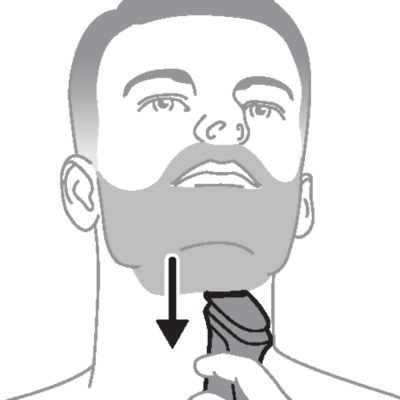
Attachments for use on beard and head
Precision trimming comb
- Attach the precision trimming comb to the full-size hair trimmer.
-
- Set the length
- Scroll the wheel on the comb to set the length. The numbers on the comb relate to the number of millimeters of hair length that will remain after trimming.
- Trim against the grain
- To trim in the most effective way, move the comb against the direction of hair growth. Make sure that the surface of the comb always stays in contact with the skin.
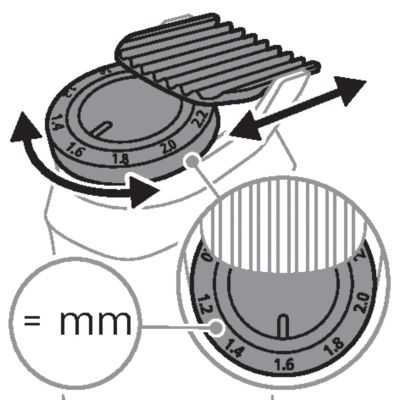
Adjustable beard and hair combs
- Attach an adjustable beard and hair comb to the full-size hair trimmer.
-
- Set the length
- Use the slide switch on the comb to adjust the length. The numbers on the combs relate to the number of millimeters of hair length that will remain after trimming.
- Trim against the grain
- To trim in the most effective way, move the comb against the direction of hair growth. Make sure that the surface of the comb always stays in contact with the skin.

Beard combs
Attachments for use on head
Always comb your hair before you start trimming.
For best results, use the appliance on clean, dry hair.
Extra-wide hair trimmer
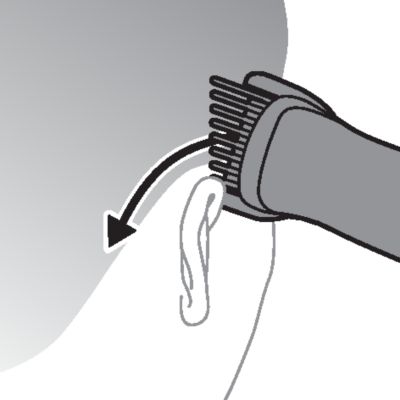
- To contour the hairline around the ears, comb the hair ends over the ears. Tilt the appliance in such a way that only one edge of the cutter blades touches the hair ends when you shape the contours around the ears.
- Neck and sideburns
- To contour the nape of the neck or sideburns, turn the appliance and make downward strokes. Move the appliance slowly and smoothly following the natural hairline.
Hair combs
- Move the trimmer slowly over the crown from different directions to achieve an even result. Press lightly and make overlapping passes over the head to ensure that all hair that should be cut has been cut.
- Always move the trimmer against the direction of hair growth. Make sure that the surface of the comb always stays in contact with the skin.
- Shake off hairs
- Gently shake the hairs off the appliance in between strokes to prevent hairs from collecting between the cutting element and the comb.
Fading hair combs
- Attach one fading hair comb to the extra-wide hair trimmer to trim the hair around the ear.
- Back to front or front to back
- Place the trimmer on your hair close to the ear. Place the trimmer at the back or front of your ear, depending on the trimming direction you prefer.
-
- Always make sure that the side of the comb with the short teeth is closest to your ear.
- Trim against the grain
- Move the trimmer slowly around the ear, while holding it steady.
- Repeat the movement several times around one ear to make sure that all the hair that should be cut has been cut to a fade. Then attach the other fading hair comb to trim the hair around the other ear.
- Shake off hairs
- Gently shake the hairs off the appliance in between strokes to prevent hairs from collecting between the cutting element and the comb.
Attachments for use on body
Always use a body comb when trimming sensitive areas.
Body combs
- Attach a body comb to the full-size hair trimmer.
-
- Trim against the grain
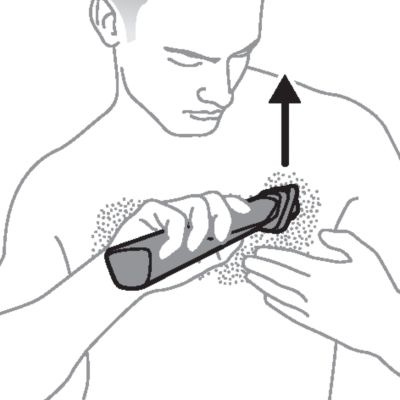
- To trim in the most effective way, stretch the skin with your free hand and move the comb against the direction of hair growth. Make sure that the surface of the comb always stays in contact with the skin.
Body groomer
- Attach the body groomer to the product.
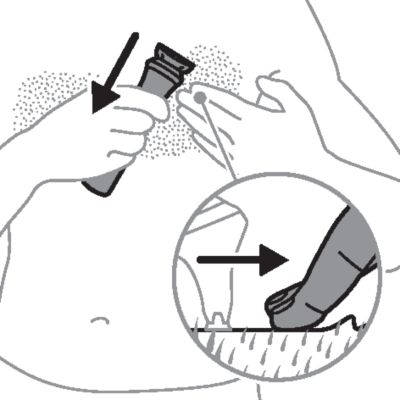
- Attach the skin protector
- Attach the skin protector to the body groomer.
-
- Shave
- To shave in the most effective way, stretch the skin with your free hand and move the groomer against the direction of hair growth. Make sure the surface of the groomer always stays in full contact with the skin.
Precision attachments for use on face
Precision trimmer
- Hold the precision trimming head perpendicular to the skin and move the trimming head upwards or downwards with gentle pressure.
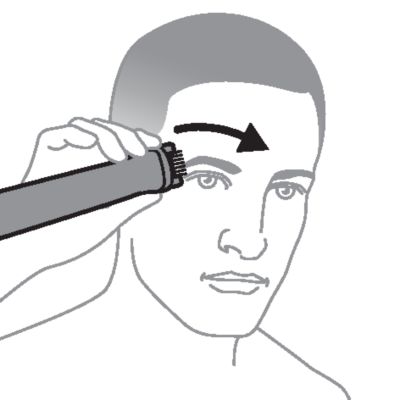
Eyebrow comb
- Comb your eyebrows in the direction of hair growth.
-
- Trim against the grain
- Slowly move the trimmer against the hair growth direction. Press lightly and make sure that the surface of the comb always stays in contact with the skin.
Nose and ear hair trimmer
- Make sure nasal passages are clean. Make sure outer ear channels are clean and free from wax.
- Do not insert the cutting element too deep into your nostrils or ear channels (max. 5 mm).
- When trimming both nose and ear hair, make firm, rotary movements to ensure that the cutting element reaches all the hairs.
- Clean the nose and ear hair trimmer after each use.
Trimming nose hair
- Gently insert the cutting element into one of the nostrils. Move the tip in and out of the nostril in a firm, rotary motion to cut the hairs to a shorter length.
Trimming ear hair
- Slowly move the cutting element along the outer ear to trim hairs that stick out beyond the rim.
- Trim inside the ear
- Gently insert the cutting element into the outer ear channel. Move the tip in and out of the outer ear channel in a firm, rotary motion to cut the hairs to a shorter length.
After every use: cleaning under the tap
- Make sure that the appliance is switched off and that the USB power source has been removed from the power outlet and from the appliance.
- Remove combs and cutting units
- Remove any comb and cutting element from the appliance.
-
- Rinse the handle
- Rinse the hair chamber under running tap water.
-
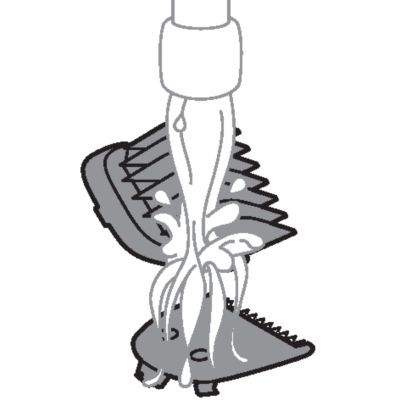
- Rinse combs and cutting units
- Clean the cutting element and combs under running tap water.
- Let it dry
- Carefully shake off excess water and let all parts air-dry completely.

Thorough cleaning
- Make sure that the appliance is switched off and that the USB power source has been removed from the power outlet and from the appliance.
- Clean the handle
- Clean the handle under the tap or wipe the handle clean with a dry or moist cloth.
- Remove combs and cutting units
- Remove any comb or cutting element from the appliance.
-
- Clean the hair chamber
- Remove any hairs that have accumulated in the hair chamber with the cleaning brush supplied.
-
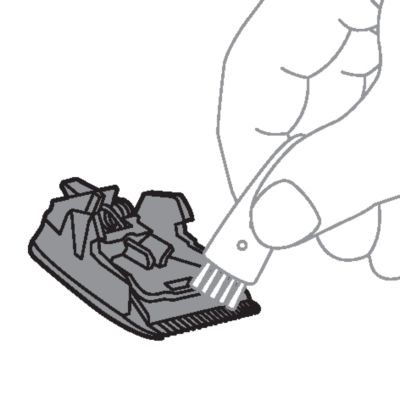
- Clean the combs and cutting units
- Remove any hairs that have accumulated in the cutting elements and/or combs with the cleaning brush supplied.
-
- Rinse under the tap
- Rinse the hair chamber, the cutting elements and combs under running tap water.
- Let it dry
- Carefully shake off excess water and let all parts air-dry completely.

Cleaning the nose and ear hair trimmer
- Rinse the nose and ear hair trimmer head under running tap water.
- Switch on and rinse
- Switch on the appliance and rinse the cutting element once more to remove any remaining hairs. Then switch off the appliance again.
- Thorough cleaning
- If a lot of hair or dirt accumulates on the cutting element, this can hinder or decrease the performance of the nose and ear hair trimmer. For a thorough clean, detach the nose and ear hair trimmer head from the appliance and immerse it in a bowl with warm water for a few minutes to soak and soften the debris. Reattach the nose and ear trimmer head and switch on the appliance to rinse off stubborn hair/debris.
- Let it dry
- Carefully shake off excess water and let all parts air-dry completely.
Cleaning the body groomer
- Remove the skin protector by pulling it upwards off the groomer.
-
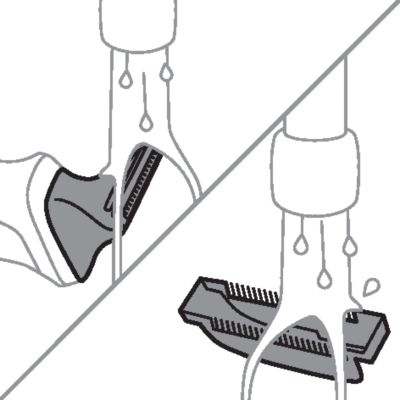
- Rinse under the tap
-
- Clean the skin protector and body groomer under running tap water.
- Let it dry
- Carefully shake off excess water and let both parts air-dry completely.
- Reattach the skin protector
- Reattach the skin protector onto the body groomer.
Note: Do not place or store the appliance where it can fall or be pulled into a tub or sink, water or other liquid while plugged in.
- Make sure that the appliance is switched off and that the USB power source has been removed from the power outlet and from the appliance.
- Do not wrap the USB cable around the appliance when storing.
- Store the appliance, the USB power source and all the accessories in the pouch supplied. Place the pouch in a safe, dry location, where it will not be crushed, banged, or subject to damage.
- Make sure that the appliance and the accessories are dry before you store them in the pouch.
To buy accessories or spare parts, visit www.philips.com/parts-and-accessories or go to your Philips dealer. You can also contact the Philips Consumer Care Center in your country (see the international warranty leaflet for contact details).
The built-in rechargeable battery must only be removed by a qualified professional when the appliance is discarded. Before removing the battery, make sure that the appliance is disconnected from the wall socket and that the battery is completely empty.
Take any necessary safety precautions when you handle tools to open the appliance and when you dispose of the rechargeable battery.
When you handle batteries, make sure that your hands, the product and the batteries are dry.
To avoid accidental short-circuiting of batteries after removal, do not let battery terminals come into contact with metal objects (e.g. coins, hairpins, rings). Do not wrap batteries in aluminum foil. Tape battery terminals or put batteries in a plastic bag before you discard them.
- Check if there are screws in the housing of the appliance. If so, remove them.
- Remove any additional screws, panels or parts of the appliance until you see the printed circuit board with the rechargeable battery.
- Remove the rechargeable battery.
If you need information or support, please visit www.philips.com/support or read the international warranty leaflet.
Warranty restrictions
Cutting units are not covered by the terms of the international warranty because they are subject to wear.
